How does Apple CarPlay-compatible smartphone integration work?
Smarter driving without loose cables
Driving is more fun when everything works smoothly together. Music, navigation, calls or messages - these days you want to be able to do it wirelessly and securely.
With a smartphone integration that CarPlay & Android Auto supports, connect your iPhone or Android phone to your car's original screen.
Everything works via Bluetooth and wifi, without having to plug in a cable.
But how exactly does this work behind the scenes? And why do so many motorists choose this upgrade?
In this article, we explain step by step what the technology does, how to use it and what to watch out for when installing it.
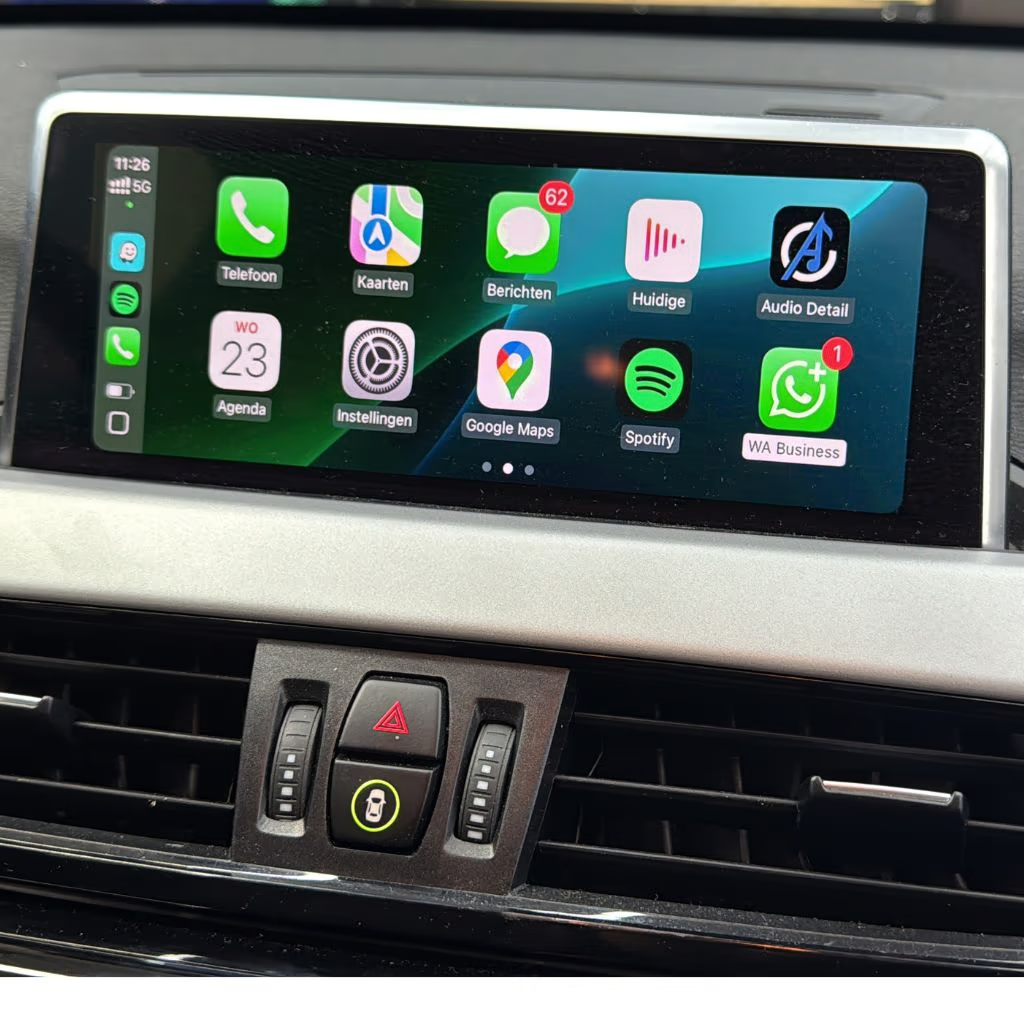

What is a smartphone integration with CarPlay support?
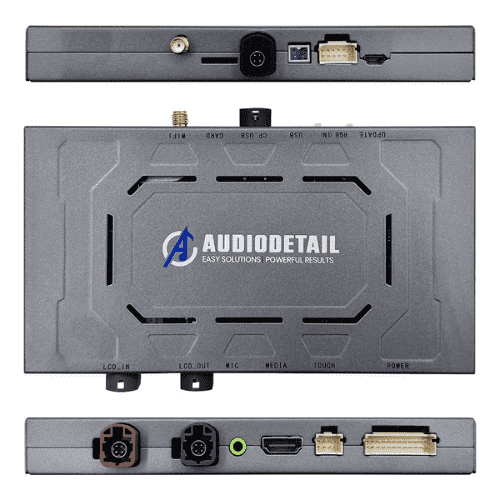
The term refers to a compact unit that is placed behind the dashboard and interfaces with the existing infotainment system.
Once your phone connects via Bluetooth and Wi-Fi, the familiar CarPlay or Android Auto menu appears on your car's original screen.
This gives you access to apps such as:
Apple Maps or Google Maps for navigation
Spotify and YouTube Music for music
WhatsApp and Messages for hands-free communication
Phone, Agenda and Podcasts
The big advantage is that the car's electronics remain intact.
The smartphone integration acts as a bridge between your existing system and your phone, with no changes to the factory software.
The hardware explained
The unit runs on a Linux platform with fast hardware (usually eight cores and 4 GB of RAM).
This ensures smooth playback, fast startup and perfect synchronization with the original screen.
The connection is through a combination of Bluetooth (for initial detection) and wifi (for data transmission, image and sound).
Briefly:
The car recognizes the unit as an original interface.
Your phone connects via Bluetooth.
Then the unit switches to Wi-Fi to display the CarPlay or Android Auto interface.
Within 5 seconds, the menu will appear on your screen.
This allows you to control everything via your steering wheel buttons, touchscreen or voice commands ("Hey Siri" or "Ok Google").

Connecting to your iPhone - step by step
The linkage is simple, and the process usually goes like this:
Activate the integration:
Hold down the assigned button on your steering wheel or dashboard for a few seconds (the exact button varies by car make).
The screen displays the main menu of the integration, for example, "Audio Detail" or "Setup."Turn on wifi on your iPhone:
Open the Wi-Fi settings. You'll see a network namedWiFi-AP_****.
Important: click the network so it remains visible, but do not connect to another network yet.Turn on Bluetooth:
In the Bluetooth list, search for "Audio Detail" and pair it with your iPhone.
Once the pairing is complete, a notification appears: "Use CarPlay with Audio Detail?"
Tap "Use CarPlay" to start the wireless connection.After about 5 seconds your car's screen is taken over by the CarPlay interface.
From then on, you can play music, send messages and navigate - all without cables.
The great thing is that from now on, this pairing happens automatically as soon as you get in and start the car.
Safe and stable - why this system works better
The reason this solution is so popular lies in the reliability and speed.
Because the integration works directly through the original screen interface, image quality remains high and the system responds without delay.
You retain your original cameras, parking sensors and steering wheel controls.
Unlike cheaper dongles or universal adapters, this uses the car's CAN bus.
That means the system communicates with the car itself, rather than just via HDMI or USB.
The result: no failures, no delays and no error messages.
Advantages of this upgrade
A smartphone integration that includes CarPlay & Android Auto supports, offers much more than just wireless music.
Here are the biggest benefits listed:
Wireless convenience: No more need for cables to use apps.
Original controls: everything works through your steering buttons and touchscreen.
Seamless integration: retention of original features and menus.
Quick connection: connect within seconds.
No software hacks: the system is plug-and-play, without encryption.
Better safety: use your navigation and messages hands-free.
Compatible with hundreds of models: BMW, among others, Audi, Volkswagen, Peugeot, Mercedes and more.

How does the installation work?
At Eye4Audio, the integration is professionally installed in our own workshop.
We partially disassemble the dashboard, connect the unit to the existing wiring and place it completely out of sight.
After installation, we test all functions and explain linking and usage.
Time: 1 to 2 hours on average
Location: only in our workshop (no mobile service)
Price: from €399 for the integration + €149 assembly (incl. VAT)
Want to know if your car is suitable?
👉 Request a compatibility check
Supported functions
Depending on the car brand, the integration supports the following functions:
Fully wireless Apple CarPlay and Android Auto
Hands-free calling with voice control
Navigation via Apple Maps, Waze or Google Maps
Spotify, YouTube Music, Podcasts and other apps
Display of parking and rearview cameras
Steering wheel and touchscreen controls
The system works intuitively and adapts to your car.
Do you have a BMW with iDrive, a VW with Discover Media or an Audi with MMI?
The interface remains recognizable and just works with the original buttons.

Frequently Asked Questions
Does it work wirelessly?
Yes, both Android Auto and Apple CarPlay work completely wirelessly via Bluetooth + wifi.
Is my car suitable?
Almost all models from 2013 - 2021 are compatible. We check this in advance based on your VIN number.
Can I install it myself?
We recommend professional mounting. The unit is connected to CAN bus and screen cables - incorrect mounting may cause malfunctions.
Will my factory settings be retained?
Yes. The system runs separately from your original software and can always be restored.
Do I get a warranty?
Yes, standard 2 years on hardware and installation.
Why choose Eye4Audio?
We install smartphone integrations and audio upgrades in a variety of car brands on a daily basis.
Thanks to our experience, we deliver an OEM-level finish - as if your car had it right out of the factory.
Our customers rate us with 5.0 stars on Google Reviews For service, workmanship and explanation.
📍 Installation only on location in Diessen
📞 Call us for advice
🎯 Schedule your installation immediately